Drag & Drop Tasks on mobile
If you have different blocks or sections of tasks within the same note, there’s no way to move a task between them. You can copy & paste the text but then lose all task metadata.
Comments: 23
Oldest
•
Newest
•
Most likes
•
Fewest likes
-
01 Feb, '23
Lane MergedHighlighted comment
It doesn’t seem like I can drag and drop tasks around on the calendar inside of the mobile app. Which is way more intuitive than manually typing a date. Would be cool if we could have this feature. -
30 Jun, '22
Jack Elliott MergedIt is currently not possible to drag and drop tasks on mobile.
Using desktop, I can change the order of tasks by dragging and dropping them within the note, or change the date / time of the task on Calendar view. It is not possible to do the same when using mobile apps. -
01 Jul, '22
Lucian System"Drag and drop support of tasks in Note / Calendar mode on mobile apps" (suggested by Jack Elliott on 2022-06-30), including upvotes (1) and comments (0), was merged into this suggestion.
-
25 Jan, '23
Eun-ji MergedIt would be a time saver to be able to drag and drop task events on mobile just like in the browser version instead of manually editing each task schedule.
-
25 Jan, '23
Lucian System"Allow Drag and Dropping Tasks on Mobile Versions of Amplenote (iOs, iPad, and Android)" (suggested by Eun-ji on 2023-01-25), including upvotes (1) and comments (0), was merged into this suggestion.
-
02 Feb, '23
Lucian System"Drag and drop tasks on mobile" (suggested by Lane on 2023-02-01), including upvotes (1) and comments (0), was merged into this suggestion.
-
13 Feb, '23
Hannan MergedCurrently, you cannot drag tasks from note to note in Android, something that is available on Widnows and Mac.
-
14 Feb, '23
Lucian System"Allow task dragging in Android" (suggested by Hannan on 2023-02-13), including upvotes (1) and comments (0), was merged into this suggestion.
-
28 Mar, '23
weirdThe way habitica does it is the best I've found, tho sometimes it doesn't register properly
-
29 Mar, '23
Dieter Fellner Mergedi would find it useful if i could drag and drop placed tasks in calendar mode like i used to it in the mobile apple calender
-
03 Apr, '23
Lucian System"move calendar items by drag and drop on mobile" (suggested by Dieter Fellner on 2023-03-29), including upvotes (1) and comments (0), was merged into this suggestion.
-
29 Dec, '23
William ButchartThis would be such a useful feature. In my job a whole day can be thrown out quite easily and then tasks need changed. Doing that on mobile currently is not easy, it requires so many clicks, click the task, then the little arrow for more info, then date, then select date, then battle with the time option which never interprets the numbers properly, then click done - if doing that with a good few tasks that is unproductive.
-
27 Jun, '24
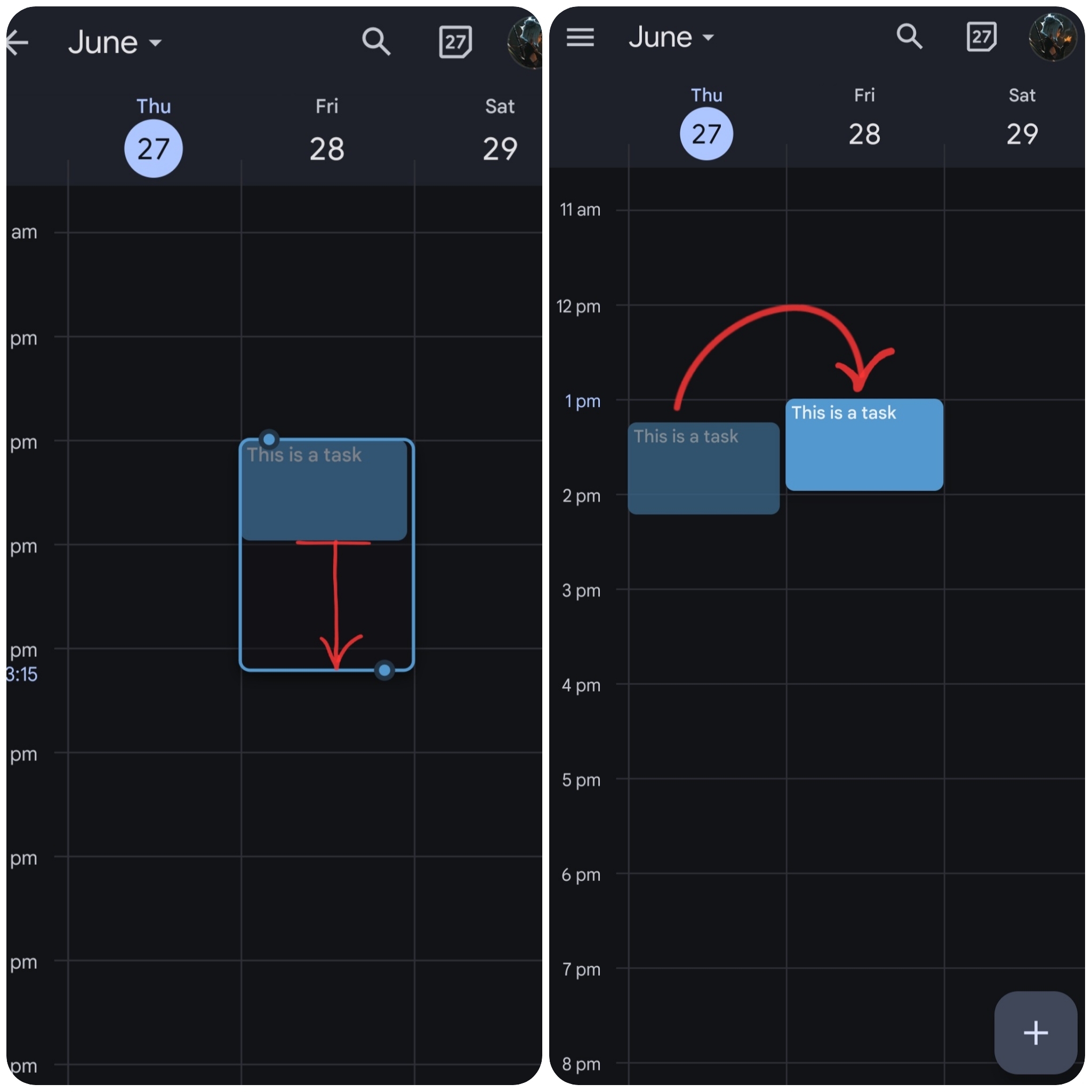
Flower MergedThis is inspired by the google calendar and I believe a very convenient useful feature. (The desktop Amplenote has this feature too)
When you hold your finger on a task it goes to edit mode and you can move the tasks in timeline or change the length of the tasks. Instead of manually changing the time and duration .
It's a more intuitive way to have control over calendar tasks on mobile app.
-
04 Jul, '24
gregmigrating from notion+todoist and love the reduced complexity and powerful search. ordering tasks on mobile is pretty important for daily driver.
-
10 Jul, '24
JP MergedI know that you stated that this is not implemented from mobile because you feel there's too little screen real estate, but The screen for iPad and Android tablets is sufficiently large enough, especially considering you can do this on these devices with these devices on a PWA version installed. However, using the PWA version on a touch screen is a little clunky, and does not allow for dragging the task from the calendar back into the sidebar to remove it.
The request: the web/PWA version be updated to allow more actions handled with touch screen inputs, OR the mobile apps for large screen devices have the calendar section modified so that you can open tasks as a sidebar and drag and drop them onto the calendar like the web version. -
18 Jul, '24
Carson Bird MergedWithout this, the calendaring function feels useless on mobile to me. I will be SO EXCITED when this is released.
-
08 Sep, '24
Lucian System"Touchscreen support: Calendar sidebar task list/drag/drop support for iPadOS (and Android tablets)" (suggested by <Hidden> on 2024-07-10), including upvotes (1) and comments (0), was merged into this suggestion.
-
08 Sep, '24
Lucian System"(Mobile App) Moving and changing the tasks in calendar timeline by holding and draging" (suggested by <Hidden> on 2024-06-27), including upvotes (10) and comments (1), was merged into this suggestion.
-
31 Dec, '24
Stephanie MergedOn mobile I have to select a task and manually modify the time. This is a pain on mobile and would be much easier to use on the fly if it had similar functionality to Google calendar enabling me to shuffle things around without having to enter into a task and edit the time.
-
07 Jan, '25
Lucian System"Mobile feature: Press, hold, and drag to reorganize events in calendar" (suggested by <Hidden> on 2024-12-31), including upvotes (1) and comments (0), was merged into this suggestion.
-
29 Jan, '25
MikeThis is a potential deal breaker for anyone attempting to use amplenote on Mobile.
First suggested almost 3 years ago and still "under consideration" doesn't give me a lot of confidence. -
17 Apr, '25
vaobullanI currently use TickTick and Notion and consider migrating to Amplenote due to many reviews and because it feels like TickTick became too small for me now. PLEASE ADD THIS DRAG and DROP feature to mobile app (I use Android). Otherwise it makes the app and the system itself useless in terms of scheduling the entire idea execution! Because REscheduling is part of the process, especially on the go! But it becomes absolutely unproductive and irritating having to make changes to your schedule on mobile. It is pointless to depend on ones laptop to drag and drop tasks. One of the previous commenters attached a screenshot of what I mean. this is crucial and is why I stay with TickTick. I seriously consider subscribing to Amplenote, but absence of drag and drop feature on mobile really stops me!