Use Bullet point to zoom in
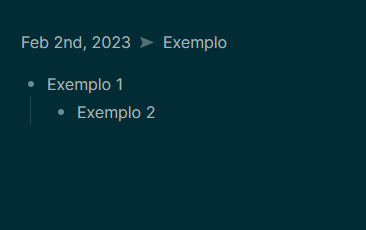
One of the things i like about Other apps is the ability to zoom in and focus on any one bullet point (including sub-bullets).
Comments: 4
Oldest
•
Newest
•
Most likes
•
Fewest likes
-
11 Mar, '24
Karina Kimberly FrosthammerHighlighted comment
To Chi: I believe that's indenting, not zoom.
What they mean by "zoom in" is that if they create a bulleted list like this:
- Things to do today
- Comfort crying students
- Lock up muffin
and click on the "-" before Things to do today, it'll open like a new note and it'll look like this:
- Comfort crying students
- Lock up muffin
but without actually creating a new note. It exists within the original note. As showncase in this video ("Obsidian vs Logseq (2024) - My Experience with Both Note-Taking Tools" by MKs Software House) at 00:36 https://youtu.be/bb_bdTxwLFU?si=XgyqhVdH_Ey-foWz&t=36 -
17 Jan, '25
LuhmannThis is the number one thing keeping me from using this app. After using an app like Workflowy, Dyanalist, or Logseq, (or Obsidian with the zoom plugin) you get really used to the ability to quickly focus in on part of your notes or jump back out to get the larger context. It is now impossible for me to use any app that doesn't have this.
-
10 Apr, '25
aerosol0Second this. I've used apps like workflowy and it's great. This is related to focus mode or zen mode.
I frequently link or extract to a new note and zoom in with ctrl space. But I would consider this a workaround.